Upwork vs. Fiverr: which one fits the business you're trying to build?
“Create a Gig and let clients come to you” sounds lovely. I would also like clients to arrive with clear instructions, an appropriate budget, and all their files named something other than FINAL-final-use-this-one.
We can dream. 😏
But if you're choosing between Upwork and Fiverr as a beginner freelancer, I want you looking past the idea of easy sales. How will you get your first conversation? Can you choose the person you're working with? What happens when the work takes twice as long as you thought?
I recommend Upwork first for most beginners following my approach. You can actively apply for suitable jobs, speak with clients before accepting, and use hourly contracts while you learn how long your service takes. Fiverr becomes much more interesting when you've figured out a service you can package and deliver repeatedly.
That doesn't make Fiverr a bad platform. It means “I know exactly what I sell” and “I'm still figuring out what I can do” need different starting plans.
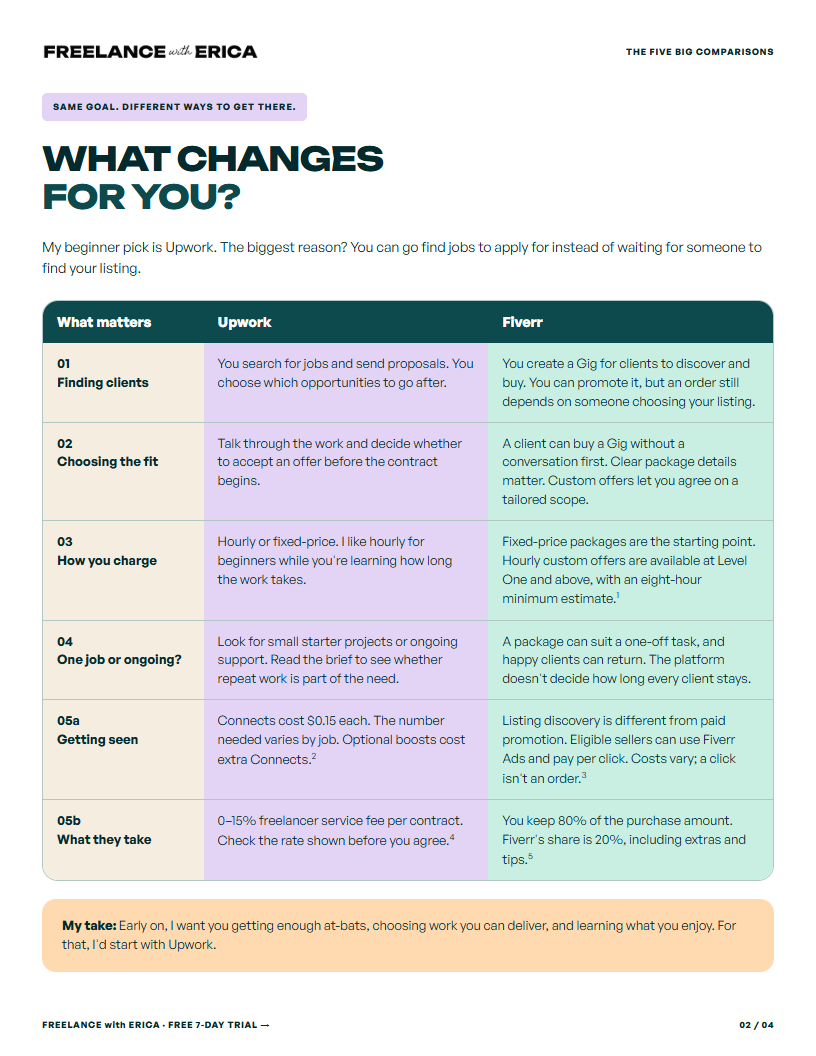
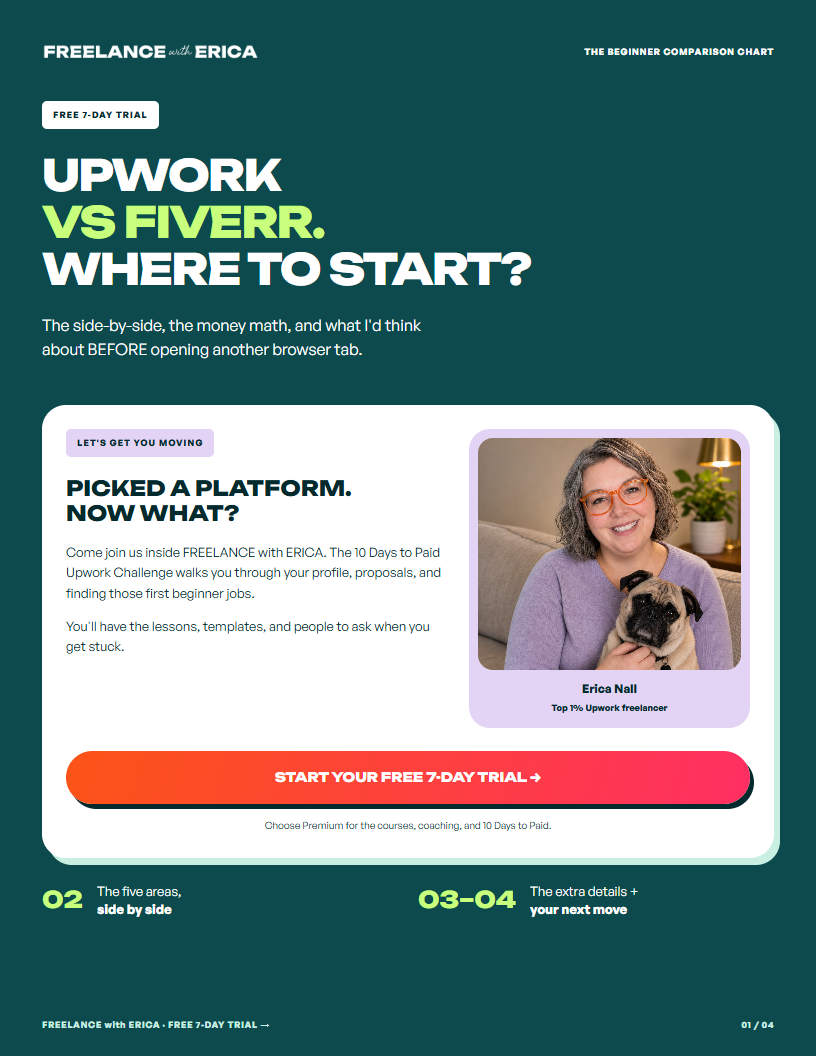
Let's compare the part where you find work, the part where you do it, and the part where you find out how much money you kept. You can also grab my free Upwork vs. Fiverr comparison chart to keep the main differences and fee examples in one place.
The biggest differences, side by side
If you're here with six tabs open and would like someone to please get to the point, start here:
- Finding work: Upwork lets you apply to posted jobs. Fiverr's core Gig model lets buyers find and purchase your listed service.
- Choosing a client: an Upwork offer is something you can discuss and accept or decline. A Fiverr buyer can purchase a standard Gig before you talk.
- Pricing: Upwork supports hourly and fixed-price work. Fiverr is package-led, with hourly offers available to Level One sellers and above.
- Service fees: Upwork charges 0% to 15% per contract. Fiverr keeps 20% of the order amount.
- Getting seen: Upwork proposals can cost Connects. A Fiverr Gig doesn't have a per-application cost, but paid advertising is an option for eligible sellers.
- Repeat work: both can support repeat clients. Upwork makes it natural to look for ongoing roles; Fiverr also supports repeat orders and subscriptions where available.
- My beginner fit: Upwork while you're learning what to offer and building experience. Fiverr when you can clearly define and price a repeatable service.
Platform details checked in September 2026. I've linked the relevant help pages below so you can check the rules that apply when you're ready to use them.
Finding your first client: proposals vs. a storefront
On Upwork, you can search for a job, read what the client needs, and decide to apply. That gives you a useful daily action while you're new: find work you can do and put yourself in front of the person hiring.
On Fiverr, you create a Gig that describes something a buyer can purchase. Think of it as a little service storefront. The buyer needs to discover it, click it, understand it, and decide to buy.
Both take work. “Passive” describes how the order can arrive. It doesn't describe all the work that makes the order possible.
You still need a useful offer, an appealing image, a clear description, and a reason for someone to choose you. If you're bringing people to the listing yourself, you also need a way to reach those people. The Gig isn't doing all of that just because you pressed Publish.
Why I like active outreach when you have no reviews
With no platform history, you're asking a client to take a chance on you. I'd rather give you a way to approach suitable clients than have your whole plan be “hopefully someone finds my brand-new listing.”
You can look for a smaller task you can confidently handle. You can respond to a specific need. You can explain why you're a good fit for that job, even if your work history on the platform is still empty.
My first-job strategy for beginners with no Upwork reviews starts with small, low-risk jobs to help you learn the platform and get some experience. You can keep learning your longer-term specialty alongside those early projects.
And yes, Upwork also has invitations and a Project Catalog for packaged services. Fiverr has ways for buyers to request custom work. I'm comparing the starting route I'd have you use, not saying either website only has one button.
Use the right question when nothing is happening
If you're sending Upwork proposals and nobody opens them, look at the jobs you're choosing, your profile headline and opening, and the first lines of your proposal. I teach you to test one change at a time so you can tell what helped.
For a Fiverr listing, separate being seen from being chosen. Are people seeing the Gig? Clicking it? Asking questions? Buying? A listing that gets no visibility has a different problem from one that gets clicks but leaves buyers unsure what's included.
That's why “I tried Fiverr and it didn't work” isn't enough information to know what to change. And changing your entire freelance identity because one week was quiet gives you even less information.
Choosing clients: the conversation before the commitment
My preference is to understand the job before I agree to do it. A wildly controversial position, apparently, when the internet keeps telling beginners to say yes to everything.
On Upwork, you can review the client's hiring history and feedback, discuss the project, and decide whether to accept. I would use that conversation to find out what the job involves, not spend the entire time trying to prove you deserve it.
For example, “format my newsletter” could mean loading finished copy into an existing template. It could also mean writing the email, finding the images, rebuilding the template, and somehow being responsible for whether anyone buys.
Same two-word job description. Very different afternoon.
Ask:
- What will you send me before I start?
- What do you want back when I'm finished?
- Is there an example of what you have in mind?
- Who will review it, and when do you need it?
On Fiverr, a buyer can order a standard Gig before that conversation happens. Your listing and requirements need to do more of the explaining up front.
Custom offers let you agree on tailored work after messaging. Fiverr's Request to order feature can require contact before purchasing selected Gigs, but it's a Seller Plus Premium feature, not something to assume every new account has.
Being able to say no before a contract starts is useful. Especially while you're learning which projects fit your skills, energy, and schedule. Neither platform can make every client a good fit for you.
Hourly vs. packages: a price tag isn't a time estimate.
I recommend hourly work for beginners moving into their chosen service because you don't yet have much evidence for how long the work takes.
You can imagine a lovely three-hour project. Then the client has files in four places, half the images are missing, and the “quick update” introduces you to a software setting neither of you knew existed.
On an hourly contract, you can agree on the work and the time available, then learn from doing it. You still need to communicate estimates, limits, and changes. Hourly doesn't mean surprise-billing the client for an unapproved adventure.
Upwork supports hourly and fixed-price contracts. Fiverr's standard Gigs package the service at a set price. Fiverr hourly offers are available at Level One and above, with a minimum eight-hour estimate.
What a package needs before you put it on a shelf
“I'll help with social media” isn't ready to be a package. “I'll schedule ten supplied posts to one channel using your existing scheduling tool” is much closer.
You can picture the work. So can the buyer. You can practice it and find out whether ten posts take you forty minutes or three hours.
Before packaging it, work out:
- The input: does the client provide finished captions and images, or are you creating them?
- The output: ten scheduled posts, ten draft posts, or ten published posts?
- The limits: one channel, one tool, and how many rounds of changes?
- The starting point: when you have all the materials, not when a buyer promises to find them.
- The extras: what would need a separate quote?
If those questions feel hard to answer, I'd take that as a reason to get more experience before selling the package. You don't have to solve them by adding “unlimited” to everything and hoping for a kind client.
For learning the work itself, explore social media support or email marketing support in my Digital Skills Library. A small, well-defined service is something you can practice before you ask someone to pay for it.
Upwork vs. Fiverr fees: what do you keep?
There are two separate costs to consider: getting in front of a potential client and the platform's cut of the work you sell.
The platform's share
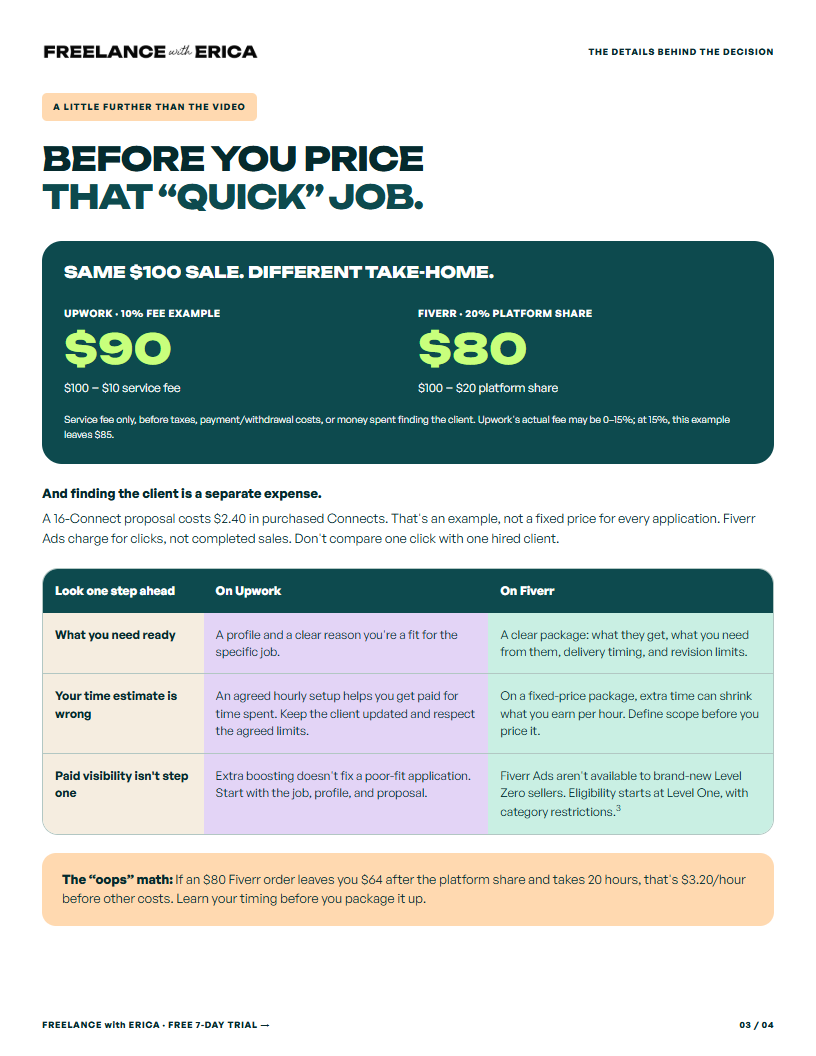
Upwork's freelancer service fee ranges from 0% to 15% per contract. You see the applicable rate before committing. Fiverr sellers receive 80% of the order amount.
For a hypothetical $500 project, you'd keep:
- Upwork at a 10% fee: $450.
- Upwork at a 15% fee: $425.
- Fiverr at a 20% fee: $400.
Those figures only subtract the freelancer service fee. Taxes, currency conversion, withdrawal costs where applicable, and the cost of finding the client are not included.
The cost of getting seen
Upwork Connects cost $0.15 each. The number required to apply varies by job. At 16 Connects, one application costs $2.40. Ten such applications would cost $24, before any optional boosts.
That isn't a promise that ten applications produce a client. It's an example of the expense you need to plan for. I wouldn't want you spending your last dollars on random proposals without paying attention to fit and results.
Fiverr doesn't charge you Connects to publish a standard Gig. Eligible sellers can use Fiverr Ads, which charges for clicks. Eligibility includes seller-level requirements, so don't build your brand-new account's plan around immediately buying your way to visibility.
Keep track of the money you're spending and the conversations and paid work coming from it.
The bigger leak might be inside the package.
Let's say you sell a $150 Fiverr package. After the 20% platform fee, you have $120.
If the work takes three hours, that's $40 per hour before your other expenses. If it takes eight hours, it's $15 per hour. The price tag didn't change. Your assumptions about the work did.
That's why I don't want you obsessing over a few percentage points while accidentally including a weekend's worth of labor in a “quick little job.” Know the fee. Also know what you're selling.
To price toward a particular amount after the service fee, divide that amount by the share you keep. To keep $100 after a 20% fee, for example, the price is $100 ÷ 0.80 = $125. Then you still need to account for time and other costs.
Doing the work and getting paid: use the contract properly.
A marketplace gives you payment tools, but you still have to use them. “The client seems nice” is not a payment setting.
For hourly work on Upwork, learn the Hourly Payment Protection requirements. Qualifying time needs the tracker, relevant activity and memos, and must stay within the agreed weekly limit. Manual time isn't covered by that protection.
For fixed-price work, agree on the milestone and check that it is funded before starting it. Submit through the platform's payment-request process. Upwork explains its payment-protection processes here; they aren't a blanket guarantee that every disagreement ends in your favor.
On Fiverr, keep the order's agreed scope, requirements, and delivery together. If the work has stages, milestones may be an option for eligible work. Don't let “while you're in there” requests quietly turn a small order into an entirely different project.
A useful response can be simple: “Happy to help with that too. It's outside the original scope, so let me send you the price and timing for adding it.”
You're allowed to clarify. You're allowed to price additional work. You're allowed to be both pleasant and a person who gets paid.
Can you build ongoing clients on both platforms?
Yes. I lean toward Upwork for beginners who want to grow into longer relationships, but “Fiverr only has one-off jobs” would be too broad.
A Fiverr buyer can return, and subscription orders can support recurring services where available. Upwork has ongoing hourly roles as well as fixed-price work that can grow through additional milestones.
The service itself has a lot to do with whether the need repeats.
A business may need a new logo once. It may need a newsletter prepared every week. A one-time inbox cleanup could lead to regular inbox support, but only if the client has that need and you want that role.
When you're thinking about repeat business, ask what happens after the first task is finished. Is there another similar task next week? Does the client have more work of the same kind? Will learning their business make the next project easier for both of you?
Don't turn a first small job into an aggressive pitch for everything you could possibly sell. Do the agreed work well. Ask a relevant question. You can discover an ongoing opportunity without attaching a sales presentation to the invoice.
Which platform fits your service?
You're still choosing a skill.
I'd begin with Upwork's small, suitable jobs while you explore a longer-term direction. You don't need to package a specialty you haven't tried yet.
Use my freelance skills quiz if you need help finding possibilities. The Digital Skills Library has learning plans and resources to help you practice. You're choosing something to try, not signing a lifetime contract with the first skill that sounds interesting.
You want to help a business a few hours each week.
Ongoing virtual assistant work can involve changing priorities: calendar help one day, research the next, a presentation after that. I'd look at Upwork hourly roles where you can agree on availability and responsibilities.
Packaging “anything you need” as a fixed-price Gig makes it hard to know what the buyer expects or how long you'll be working. Choose a defined piece if you want to sell it as a package.
You already have a repeatable creative service.
Maybe you've edited several short videos from supplied footage and know your process. You can define the maximum raw footage, finished length, captions, format, and revisions. That gives you a much stronger basis for a Fiverr Gig than “I'll make you an amazing video.”
You can also offer that work on Upwork. The point is that you're now choosing a sales channel for a service you understand.
The client needs you to figure out the problem first.
For work like automation, “connect my tools” might hide a lot of questions. Which tools? What information moves? What happens if someone submits the form twice?
I'd favor a conversation and a small paid first stage over a broad fixed package when you can't yet see the moving parts. This becomes even more important as your work gets more specialized.
Should you use both? Eventually, maybe. All at once, not necessarily.
You can have more than one way for people to hire you. I just don't want your first month disappearing into setting up profiles everywhere while you avoid the part where you talk to clients.
For the beginner route I teach, that usually means:
- Choose Upwork as the starting platform and get your profile ready.
- Look for small jobs that fit your current abilities, while learning your chosen skill.
- Track applications, conversations, paid work, and time spent delivering.
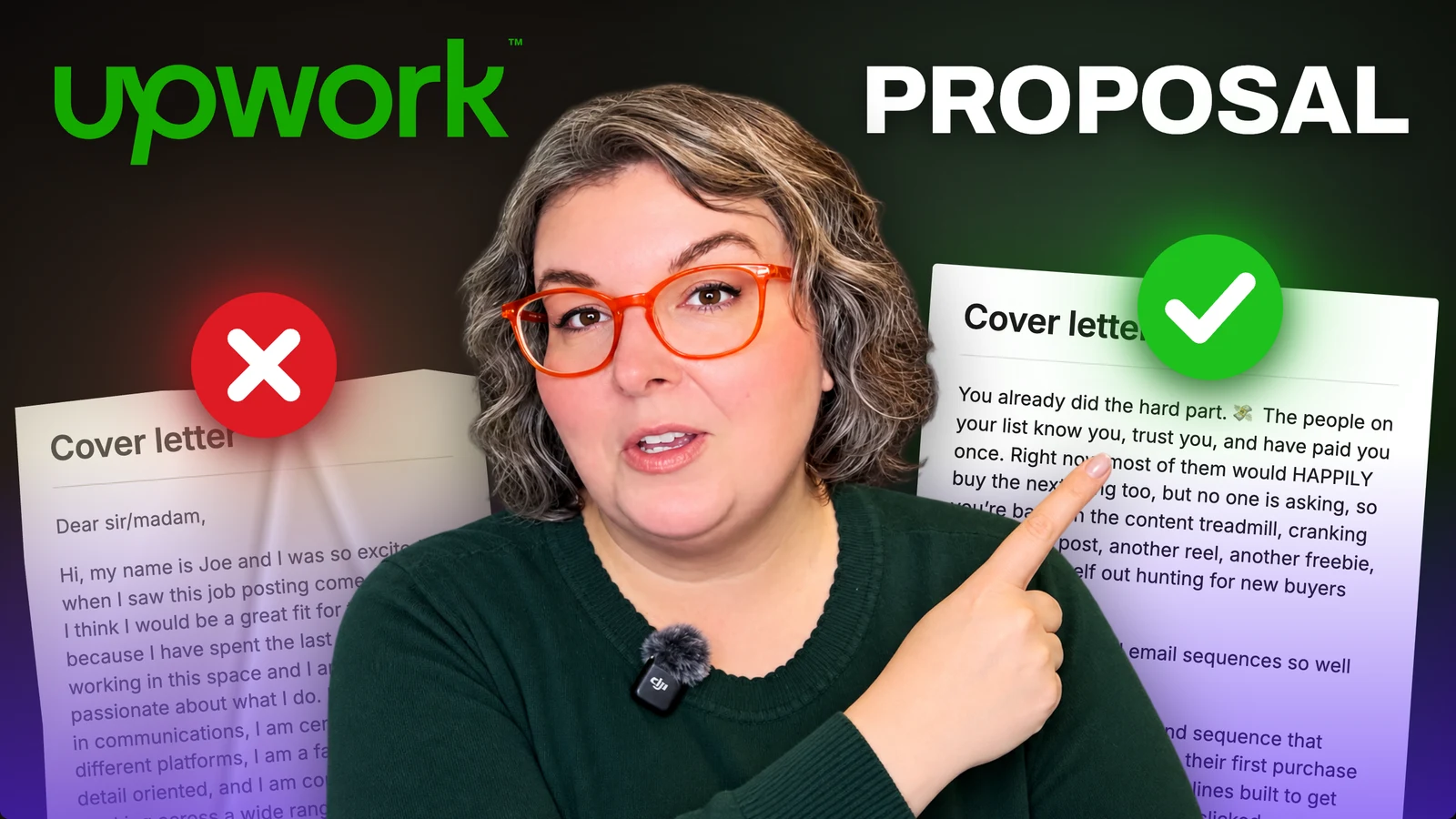
- Improve one part of the process at a time. My proposal-writing walkthrough can help with the application itself.
- Once you know a service well enough to price and repeat it, consider a Fiverr listing as another way to sell it.
That is much more useful than choosing a platform based on whoever posted the biggest income screenshot this week. You're building a business that has to work for you, including the ordinary days when you're the person doing the work.
Grab the Upwork vs. Fiverr comparison chart if you'd like the fee examples and package-readiness questions beside you while you choose.
And if you want help getting started, come check out FREELANCE with ERICA with a free 7-day trial. My 10 Days to Paid Upwork Challenge is part of Premium, with courses and coaching to help you get your first clients and build from there. You can be a beginner. That's who I built it for. 🧡
A FEW QUICK ANSWERS
Before you open another tab…
Is Upwork or Fiverr better for beginners?
I recommend Upwork first for beginners who want to actively apply for work, talk with clients before accepting, and learn how long their services take. Fiverr can become a useful second channel once you know what to package.
Does Fiverr offer hourly work?
Yes. Fiverr offers hourly work to Level One sellers and above, with a minimum eight-hour estimate for an hourly offer. New sellers should still understand its fixed-price Gig format.
What are Upwork and Fiverr’s freelancer fees?
As checked in September 2026, Upwork’s freelancer service fee is 0% to 15% per contract. Fiverr sellers receive 80% of the order amount. Application, advertising, tax, and other costs are separate.
Do I need to be an expert before using a freelance platform?
You need to be able to deliver the work you accept. You can start with small, clearly defined jobs that fit your current abilities while practicing and learning a more specialized service.
Can I use both Upwork and Fiverr?
Yes. I suggest getting established with one starting route before adding another. A repeatable service you understand is a stronger basis for a Fiverr package than an untested idea.

YOUR GUIDE · ERICA NALL
I’m an Expert-Vetted freelancer and sales copywriter. I teach beginners how to find their freelance skills, write stronger proposals, and start working with clients.
A little more about me ↗